![ovex-logo-white-1.png]](https://support.ovex.io/hs-fs/hubfs/ovex-logo-white-1.png?height=40&name=ovex-logo-white-1.png)
When making a non-ZAR fiat deposit, you can now attach your Proof of Payment (POP) directly to your deposit on the OVEX platform to expedite processing.
Submitting your POP through the platform allows the OVEX payments team to identify and verify your deposit immediately upon receipt — significantly reducing the time between your transfer and your balance reflecting in your account
Step-by-Step Instructions
Step 1: Initiate a Deposit & Complete Your Bank Transfer
1. Log in to your OVEX account.
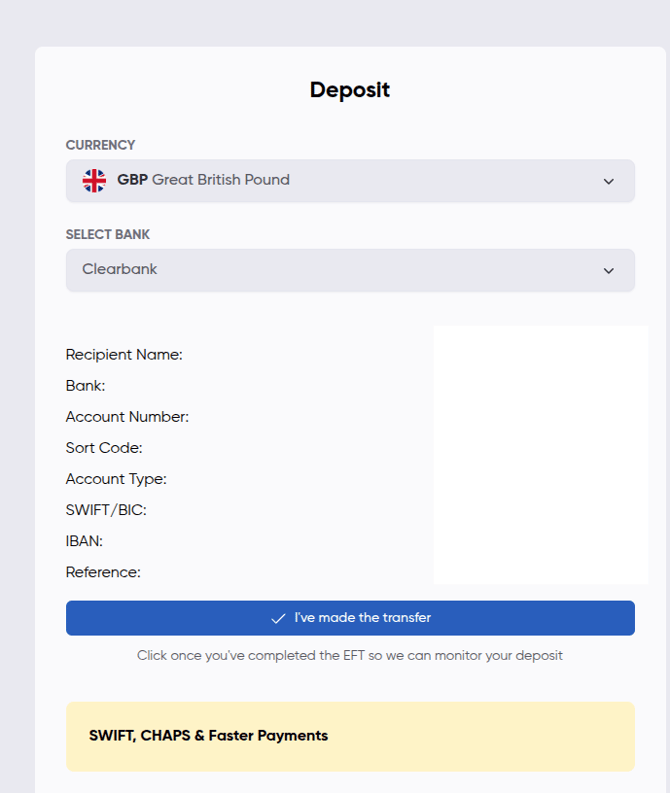
2. Navigate to the Deposit page by clicking on Wallets in the nav bar and then Deposit. Next select the fiat currency (e.g. TZS) you are looking to deposit in the Currency field.
3. Select the relevant bank from the Select Bank dropdown.
The modal will then display the beneficiary banking details:
-
Recipient Name
-
Bank
-
Account Number
-
Sort Code
-
Account Type
- SWIFT/BIC
-
IBAN (where applicable)
-
Reference (critical — must be included in your transfer)
5. Complete the EFT/bank transfer using the exact details shown, ensuring the SN reference number is included.
6. Once the transfer is done, click I've made the transfer.
Step 2: Confirm Your Deposit & Upload POP
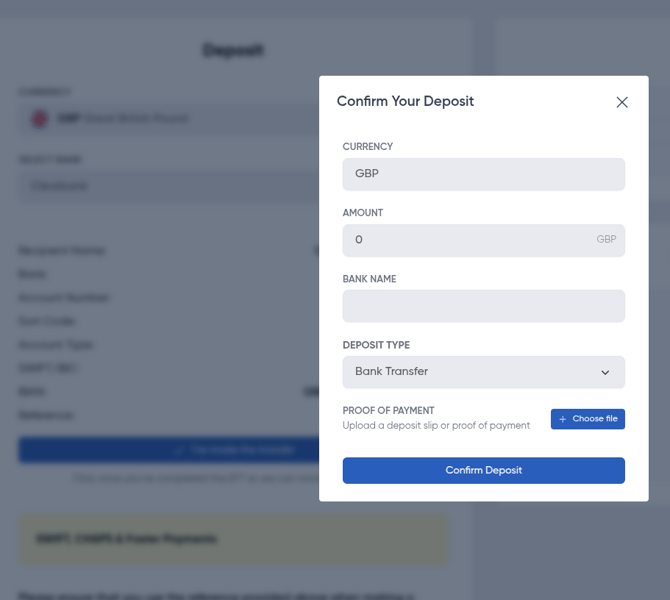
Fill in the following fields:
| Field | Description |
|---|---|
| Currency | Auto-populated based on your selection (e.g. TZS) |
| Amount | Enter the exact amount transferred |
| Bank Name | Enter the name of the bank you sent from |
| Deposit Type | Select Bank Transfer or Cheque |
| Proof of Payment | Click "+ Choose file" and upload your POP (bank-stamped deposit slip or screenshot of completed transfer) |
7. Once all fields are complete and your POP is attached, click "Confirm Deposit".
What Happens Next
Once you Submit:
- Your deposit will be reviewed and verified against your POP and reference number.
- Your fiat balance will reflect in your OVEX account once confirmed.
Important Notes
- Always use the exact SN reference number shown in the deposit modal. Transfers without a matching reference may cause processing delays.
- Accepted POP formats: PDF, JPG, PNG.
- Ensure the POP clearly shows the sender name, amount, date, and destination account.
- If your deposit is not reflected within 48 hours, contact support@ovex.io