---
title: HOW TO CLASSIFY AND CREDIT YOUR CRYPTO DEPOSITS (CARF COMPLIANCE)
description: Learn how to classify and credit your crypto deposits on OVEX. Follow our step-by-step guide to comply with new CARF regulations and unlock pending funds.
---
[Skip to content](https://support.ovex.io/how-to-classify-and-credit-your-crypto-deposits-carf-compliance#main-content)
English
Show submenu for translations
[Submit a Ticket](https://support.ovex.io/kb-tickets/new?hsLang=en)
![ovex-logo-white-1.png\]](https://support.ovex.io/hs-fs/hubfs/ovex-logo-white-1.png?height=40&name=ovex-logo-white-1.png)
Open main navigation
Close main navigation
- English
Show submenu for translations
- [Submit a Ticket](https://support.ovex.io/kb-tickets/new)
- [Back to OVEX](https://ovex.com/en)
[Back to OVEX](https://ovex.com/en)
Hello. How can we help you?
- There are no suggestions because the search field is empty.
1. [Help Center](https://support.ovex.io/?hsLang=en)
2. [Deposits & Withdrawals](https://support.ovex.io/deposits-withdrawals?hsLang=en)
3. [Deposits](https://support.ovex.io/deposits-withdrawals?hsLang=en#deposits)
# HOW TO CLASSIFY AND CREDIT YOUR CRYPTO DEPOSITS (CARF COMPLIANCE)
## To comply with the new Crypto-Asset Reporting Framework (CARF) regulations, all incoming cryptocurrency deposits must be classified by the recipient before they can be credited to your account. This ensures transparency regarding the origin of your funds.
#### **Steps to Follow:**
**1. Check for Pending Deposits**
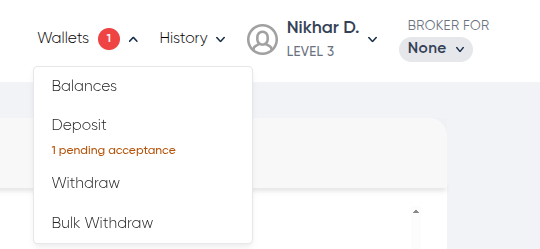
Navigate to the **Wallets** tab in the top navigation bar. If you have an uncredited deposit, a **"Pending"** notification will appear next to the **Wallets** as well as **Deposits** option in the dropdown menu.

**2. View the Action Banner and Declare your Deposits**
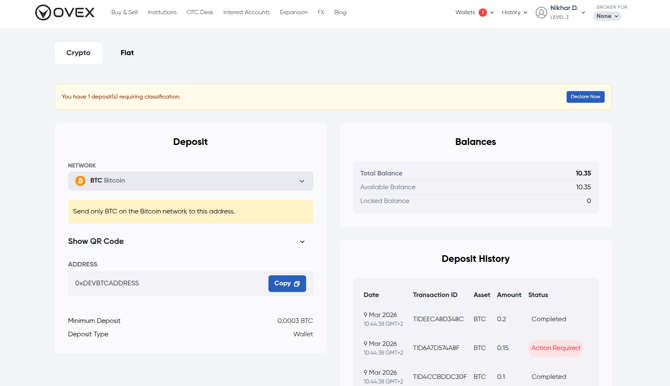
Once you click on **Deposit**, you will be taken to the main Deposits page. A prominent banner at the top of the page will indicate how many outstanding deposits require action. Click on the **Declare Now** button to access these.
**3. Declare and Credit your Deposits**
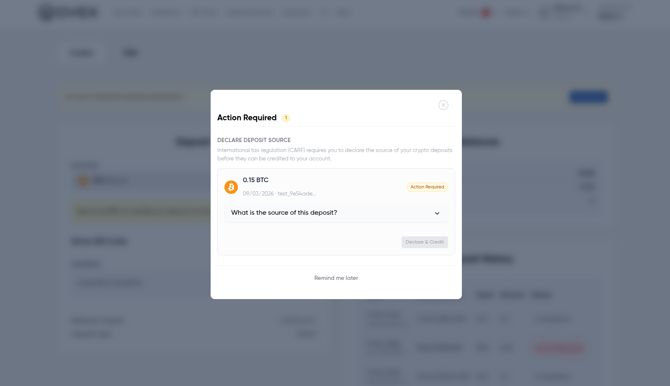
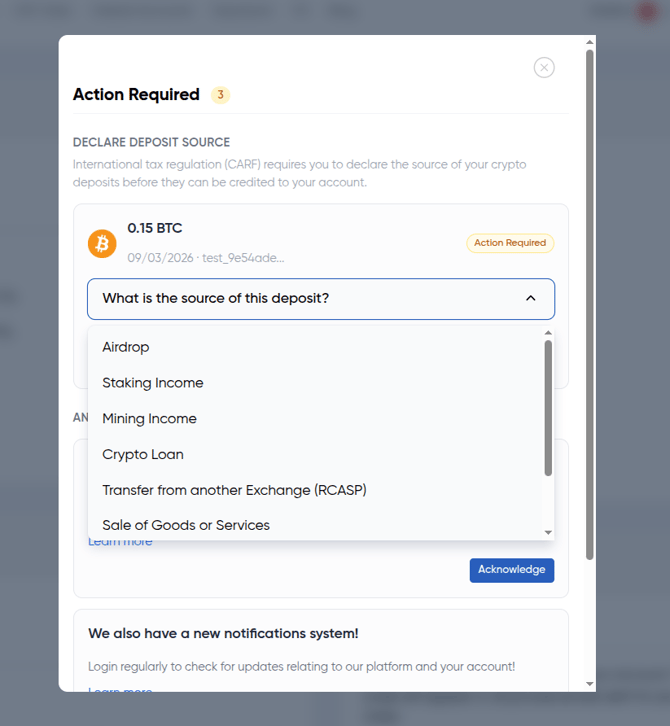
For each transaction in the pop-up modal, select the **Source of Deposit** from the dropdown menu (e.g., Transfer from another Exchange, Airdrop, Sale of Goods or Services, etc.). Once selected, click the **Declare and Credit** button. **Your funds will be moved from "Pending" to your available balance immediately.**
### **Why is this happening?**
The **Crypto-Asset Reporting Framework (CARF)** is a new international standard developed by the OECD to increase transparency in the digital asset space. Much like traditional banks report on interest and transfers, crypto platforms are now required to identify the origin of incoming funds.
By declaring your deposit source, you help us ensure your account remains compliant with global tax and anti-money laundering (AML) standards, which ultimately provides a safer and more regulated environment for all our users.
- [General](https://support.ovex.io/general?hsLang=en#main-content)
- [Getting to know OVEX](https://support.ovex.io/general?hsLang=en#getting-to-know-ovex)
- [Tax Information](https://support.ovex.io/general?hsLang=en#tax-information)
- [Cryptocurrency](https://support.ovex.io/cryptocurrency?hsLang=en#main-content)
- [Stablecoins](https://support.ovex.io/cryptocurrency?hsLang=en#stablecoins)
- [How to Buy Cryptocurrency](https://support.ovex.io/cryptocurrency?hsLang=en#how-to-buy-cryptocurrency)
- [Account Details](https://support.ovex.io/account-details?hsLang=en#main-content)
- [Verifying your OVEX Account](https://support.ovex.io/account-details?hsLang=en#verifying-your-ovex-account)
- [OVEX Account Types](https://support.ovex.io/account-details?hsLang=en#ovex-account-types)
- [Trade History](https://support.ovex.io/account-details?hsLang=en#trade-history)
- [Delete my Account](https://support.ovex.io/account-details?hsLang=en#delete-my-account)
- [How to Switch my Account Email](https://support.ovex.io/account-details?hsLang=en#how-to-switch-my-account-email)
- [Deposits & Withdrawals](https://support.ovex.io/deposits-withdrawals?hsLang=en#main-content)
- [Withdrawals](https://support.ovex.io/deposits-withdrawals?hsLang=en#withdrawals)
- [Deposits](https://support.ovex.io/deposits-withdrawals?hsLang=en#deposits)
- [Security](https://support.ovex.io/security?hsLang=en#main-content)
- [OVEX Security](https://support.ovex.io/security?hsLang=en#ovex-security)
- [2FA](https://support.ovex.io/security?hsLang=en#2fa)
- [Phishing](https://support.ovex.io/security?hsLang=en#phishing)
- [OVEX Brokers](https://support.ovex.io/ovex-brokers?hsLang=en#main-content)
- [Becoming an OVEX Broker](https://support.ovex.io/ovex-brokers?hsLang=en#becoming-an-ovex-broker)
- [OVEX OTC Desk For Brokers](https://support.ovex.io/ovex-brokers?hsLang=en#ovex-otc-desk-for-brokers)
- [OVEX Buy/Sell](https://support.ovex.io/ovex-buy-sell?hsLang=en)
- [Interest Accounts](https://support.ovex.io/interest-accounts?hsLang=en)
- [OTC](https://support.ovex.io/otc?hsLang=en)
- [OVEX FX](https://support.ovex.io/ovex-fx?hsLang=en)
[](https://www.ovex.io/)
Help Center
Copyright © 2026, OVEX